In this guide, we explain our recommended steps for configuring the project board for a seamless application management system later in the process. Before we test the open call and launch, we need to set up a project board which will be used to manage the applications as they are submitted.
For the purposes of this guide, an open call can also be referred to as an opportunity or a challenge. An application can also be referred to as an idea.
Overview
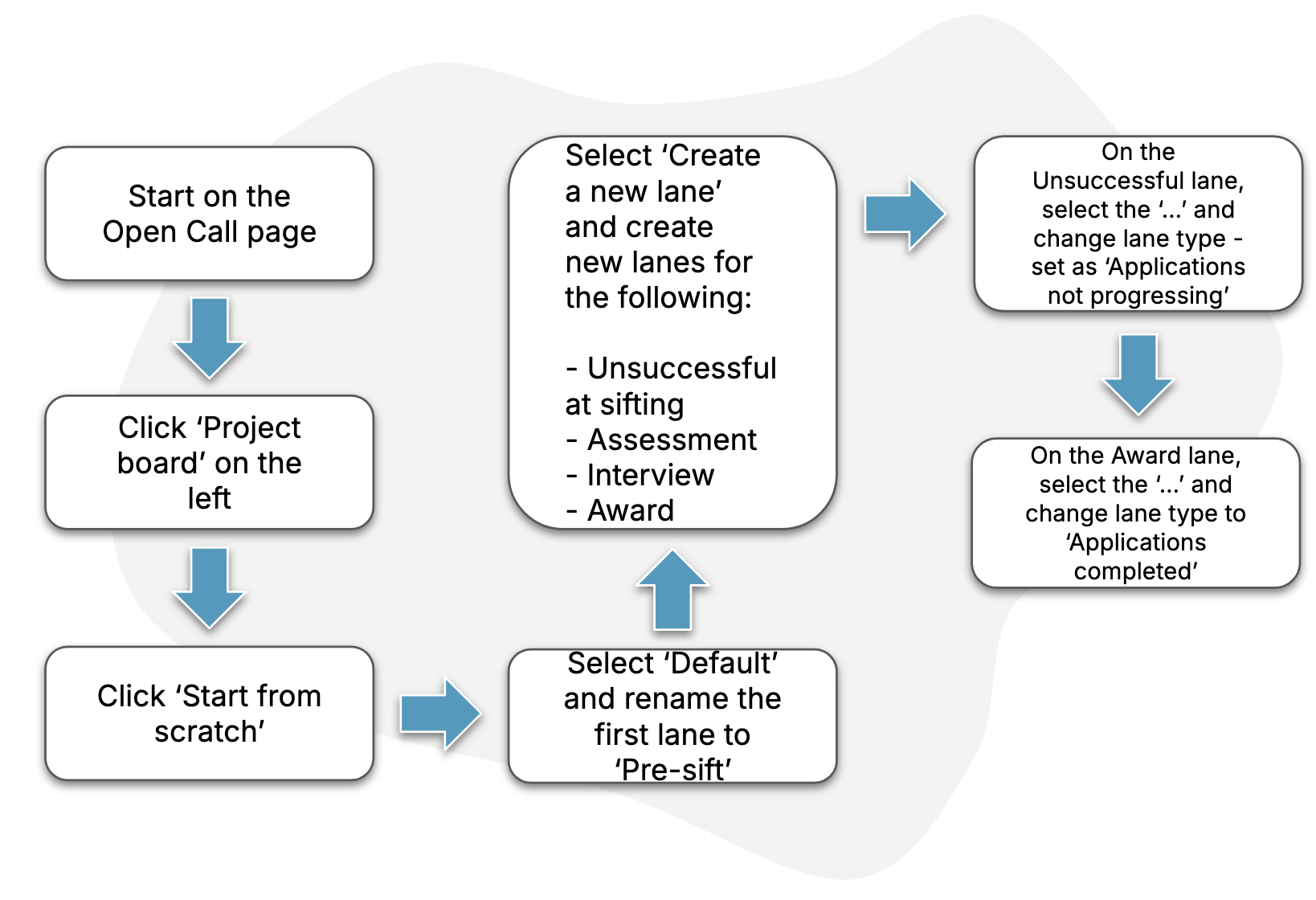
The diagram below describes the key steps in the process.
Guide
1. Find the project board page
Follow the steps in this How-To to find the page for your open call’s project board.
2. Choose to “Start from scratch”
When asked to choose a starting point for your board, select “Start from scratch”.
3. Rename the default lane
Give your default lane a new name of “Pre-sift”.
4. Build out the board with additional lanes
We recommend adding the following lanes for structuring the management of applications to your open call:
-
“Unsuccessful at sifting”
-
“Assessment”
-
“Interview”
-
“Award”
Use these instructions for help with creating new lanes.
5. Configure lane “types”
Use the lane types facility to change the “Unsuccessful at sifting” lane to a “Not progressing” type, and the “Award” lane to the “Completed” type.
More information on lane types is available in this How To.